


 Previous
The Menu screen is displayed when you press the [Menu] key/ .
.
This screen is used to accept registration requests, configure network settings, update firmware, and check the system information.
If the Menu screen is displayed, the machine's status switches to "Offline". You cannot connect to or receive connection from contacts when the machine's status is "Offline".
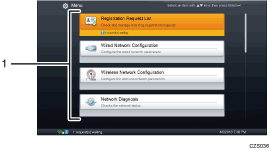
Configuration items
Displays configurations.
Menu screen (When the machine cannot connect to the network during startup)
If the machine cannot connect to the network during startup due to a problem with the network settings or the network environment, press the [Menu] key/ while the message “Connecting to the network...” is displayed. After doing this, the Menu screen will appear. Change Wired/Wireless Network Configuration or perform Network Diagnosis to connect to the network.
The machine repeatedly attempts to connect to the network. If the machine successfully connects to the network, the message “Connection established.” appears in the lower left of the Menu screen. After this message appears, you can start a meeting.

If the machine cannot connect to the network, see When the Machine Cannot Connect to the Network.


