


 Previous
This screen is used to connect to or receive call from the contact.
The machine's status switches to "Ready" only when the Contact List screen is displayed. This status allows you to start a meeting by connecting to or receive connection from contacts.
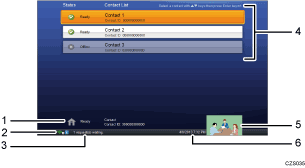
Machine status
Displays the status, name, and Contact ID of the machine.
Network status icon
 : When using a wired network
Displays an icon that indicates the number of the profile being used.
 : When using a wireless network
Displays an icon that indicates the strength of the signal reception and the number of profile being used.
The icon changes according to the strength of the signal:
 :Very strong
 :Strong
 :Weak
:Weak :Very weak
 :No reception
Message
Displays messages such as a notification that a registration request has been received or a firmware update is available.
Contact List
Displays a list of contacts registered in Address Book.
This list displays the status, name, and Contact ID of each contact.
Video on the machine
Displays a video taken by this machine.
This video can be used as a reference to adjust the position of the camera.
Current date and time
Displays the current date and time.

For details about the machine's status, see To Start a Meeting.


