


 Previous

Do not attempt to raise or move this machine by the camera unit.
Do not attempt to move the camera unit beyond its range of movement.
Observe the following precautions when handling the camera lens:
Do not touch the lens.
Do not push down on the lens.
Do not rub the lens.
Ranges of movement
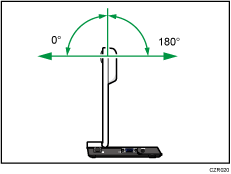
The camera can move within the following range:
0°-180° (when the vertical position of the camera unit is 0 degrees)
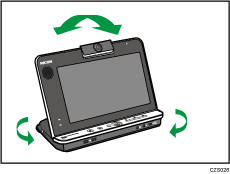
 Adjust the orientation by moving the machine and rotating the camera unit vertically while checking the screen display.
Set the camera so that the desired object is displayed on the screen.

When the camera unit is set at a 90 degree angle, the video is displayed upside down.
Fingerprints or dust on the lens cover can cause image quality to deteriorate. If the lens cover is dirty, lightly wipe it with a soft cloth.


