


 Previous
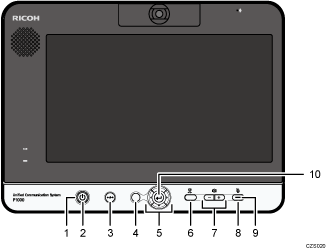
Power indicator
Lights when the machine turns on.
This indicator blinks while the machine is starting up or shutting down.
[Power] key/

Used to turn the machine on and off.
[Disconnect] key/

Used to leave a meeting.
[Menu] key/

Used to display the Menu screen.
Cursor keys ([
 ] [
] [ ] [
] [ ] [
] [ ] key)
Used to select a menu, dialog, or setting.
These keys are also used to switch between screen layouts during a meeting.
[Camera] key
Used to change the display of the camera.
For details about changing the display of the camera, see Adjusting the Camera.
Speaker volume keys ([
 ] [
] [ ] key)
Used to adjust the speaker volume.
[Mute] key
Used to temporarily disable audio input on the machine.
Mute indicator
Flashes if the [Mute] key is used to disable the microphone.
[Enter] key/

Used to activate the menu, setting, or set value selected with the cursor keys.
This key is also used to connect and leave a meeting.


