


 Previous
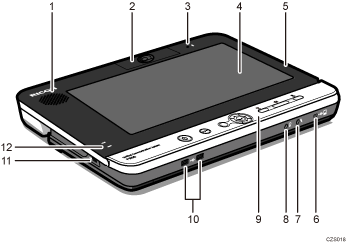
Speaker
Outputs audio from other parties.
Camera unit
Captures live video that is transmitted to other parties.
Microphone
Inputs audio from the machine.
Display
Displays video output
Display unit
This machine consists of a stand unit and a display unit.
Raise the display unit when using the machine.
USB port (type mini-B)
Used to connect the machine to your computer and share the computer screen.
Audio input
Used to connect the machine to the analog audio input device, such as a microphone or headset.
Audio output
Used to connect the machine to the analog audio output device, such as a headphones or headset.
Control Panel
Provides a set of keys used to operate the machine.
For details about the control panel, see Control Panel.
USB ports (type A)
Used to connect digital audio input/output devices such as a USB microphone speaker, and video input devices such as a USB camera.
Anti-theft lock hole
Hole for connecting the anti-theft chain.
Battery status indicator
Displays the charging status and remaining battery level.
For details about battery status indicator, see Checking the Battery Status.


