


 Previous

|
 Insert an SD card into the SD card slot on the side of the control panel.
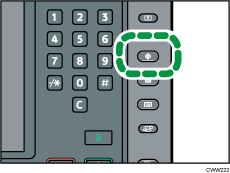
 Press the [User Tools] key.
 Press [Adjustment Settings for Operators].
 Press [Machine: Maintenance].
 Press [Back Up / Restore Custom Paper Data].
 Press [Back Up Custom Paper Settings].
 Press [OK].

If a previously created backup file is on the SD card, it is overwritten by the back-up.


