


 Previous
Paper that has a horizontal length of 139.7–487.7 mm (5.50–19.20 inches) and a vertical length of 100.0–330.2 mm (3.94–13.00 inches) can be fed in from the multi bypass tray (Tray 7). Note however that the limitation on the horizontal and vertical length range will vary depending on which options are installed.
When prints are delivered to the shift tray of the finisher or the stacker tray:
Horizontal length: 139.7–487.7 mm (5.50–19.20 inches), vertical length: 139.7–330.2 mm (5.50–13.00 inches)
 Load the paper face up in the multi bypass tray (Tray 7).
 Press [Tray 7].
 Press [Paper Size].
 Press [Program Custom Size].
 Enter the horizontal size with the number keys, and then press [
 ].
].
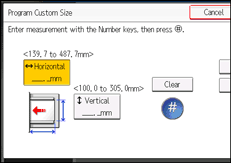
 Enter the vertical size with the number keys, and then press [].
 Press [OK] twice.
 Place the originals, and then press the [Start] key.

You can register a custom paper size. For details, see Registering a custom size. You can also recall the registered custom paper size. For details, see Recalling the registered custom size.


