


 Previous
This section explains the RICOH PJ Interactive Software launcher screen and how to operate it.
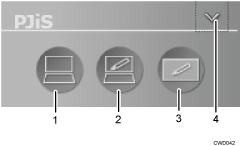
Returns to the desktop screen from the whiteboard screen.
Imports the desktop screen to the whiteboard screen.
Display the whiteboard screen.
Displays the whiteboard screen.
Hides the launcher.
In addition, hide the whiteboard screen if it is active.
To display the whiteboard screen, click
 , the PJiS icon on the task tray.


