


 Previous
Hold the middle of the electronic pen. If the nib or bottom of the electronic pen is held, the position of the electronic pen will not be recognized correctly.
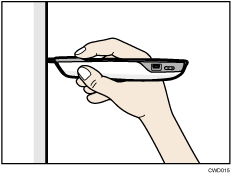
To align the point position of the electronic pen with the pen nib switch, and not the center of the pen, use the point adjustment button to move the point position up.
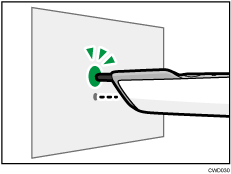
If the pen nib is pointed toward the screen projected by the projector in Interactive Mode, the electronic pen is recognized and the pointer on the projected computer screen can be operated with the electronic pen. See "Enabling the Projector to Recognize the Electronic Pen", Read This First .
.


