


 Previous
Select the orientation of the originals and copies if the original is two-sided or if you want to copy onto both sides of the paper.
Top to Top
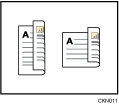
Top to Bottom
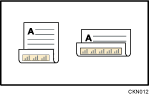
 Press [Orientation].
 Select [Top to Top] or [Top to Bottom] for [Original] if the original is two-sided.
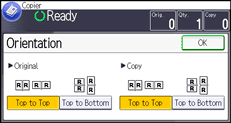
 Select [Top to Top] or [Top to Bottom] for [Copy].
 Press [OK].

The default is [Top to Top]. You can change the default orientation under [Original's Orientatn. in Duplex Mode] and [Copy Orientation in Duplex Mode] in User Tools. For details about these settings, see General Features
 .
.


