


Attaching and Detaching the Multi Bypass Tray
This section explains how to attach and detach the multi bypass tray.

Before installing or removing options, always disconnect the power cord plugs from the wall outlet.
Do not forcefully press down on the multi bypass tray. It may come off the machine and paper misfeeds or positioning problems may result.
Attaching the multi bypass tray
 Press and hold down the [Power] key until it turns off, and then unplug the power cord.
 Disconnect the USB cable or Ethernet cable.
 Take the multi bypass tray out of the box, and remove the tape.
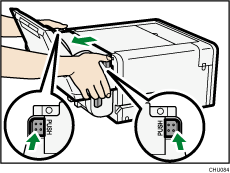
 Attach the multi bypass tray while pressing the tabs on each side, and then push it in all the way.
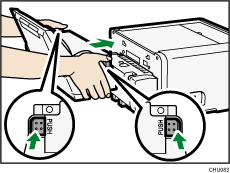
Make sure to return the tabs to their original positions.
 Connect the power cord, USB cable, or Ethernet cable.

After attaching an option, check that the printer driver has recognized it. See Specifying Settings on [Accessories] Tab
 , Displaying the Machine Status on a Macintosh.
After attaching the multi bypass tray, you must register where to start printing on paper loaded in the multi bypass tray. See Registration
.The coin screw on the underside of the multi bypass tray is used when setting the side fence.
Detaching the multi bypass tray
Press and hold down the [Power] key until it turns off, and then unplug the power cord.
Disconnect the USB cable or Ethernet cable.
Remove any paper in the bypass tray.
If the bypass tray extension is pulled out, push it back in.
Pressing the tabs on each side of the multi bypass tray, detach the unit.