




 Manuals
 Contents
 Previous
 Next
Next


| | | |
| |||
| |||
| | | |
| ManualsContentsPreviousNext | | |

If you want to use the paper size and feed direction that are not indicated on the paper size dial, set the dial to " ". In this case, you should set the paper size using the control panel. Follow the procedure described below to set the paper size.
The printer cannot print from applications that do not support custom size paper.
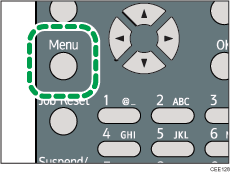
Press the [Menu] key.
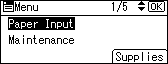
Press the [ ] or [
 ] key to select [Paper Input], and then press the [OK] key.
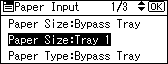
Press the [ ] or [ ] key to select [Paper Size: (tray name)], and then press the [OK] key.
In the illustration below, [Paper Size:Tray 1] is selected for Tray 1.
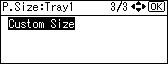
Select [Custom Size] using the scroll keys, and then press the [OK] key.
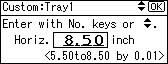
Enter the horizontal value, and then press the [OK] key.
 (mainly Europe and Asia)
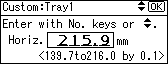
 (mainly North America)
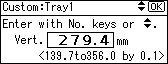
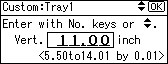
Enter the vertical value, and then press the [OK] key.
(mainly Europe and Asia)
(mainly North America)
Press the [Menu] key to return to the initial screen.

For details about the available paper size, see Supported Paper for Each Tray.
After specifying the paper size, specify a paper type using the control panel and printer driver. For details on specifying a paper type using the control panel, see Specifying a paper type for standard or optional paper feed tray.
For details about the printer driver, see the printer driver Help.
 |
 | Copyright (C) 2010 |
