












 Manuals
 Contents
 Previous
 Next
Next


| | | |
| |||
| |||
| | | |
| ManualsContentsPreviousNext | | |
The combination chart given below shows which modes can be used together.
Blank: These modes can be used together.
×: These modes cannot be used together. The first mode selected will be the mode you are working in.
 : These modes cannot be used together. The second mode selected will be the mode you are working in.
The following shows the combinations of functions:
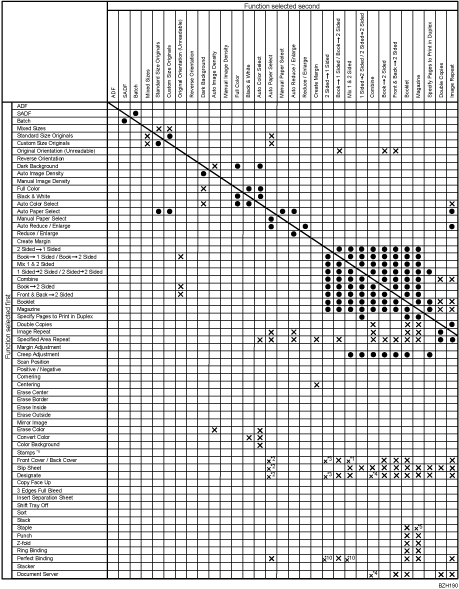
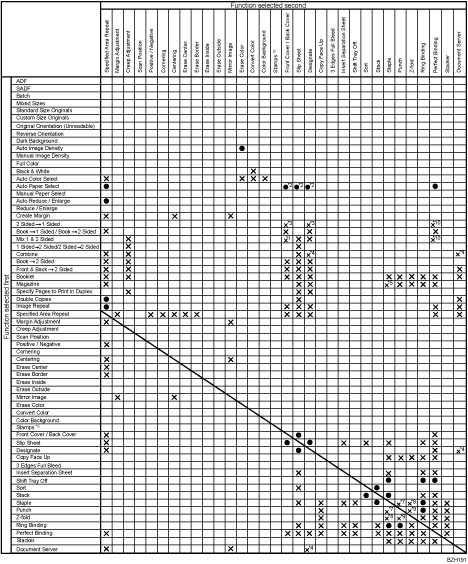
The following combinations are not possible.
*1 Covers with 2 Sided  1 Sided
*2 Back covers when copying with Auto Paper Select. Possible when printing a stored document.
*3 2 Sided 1 Sided with Covers or Designate
*4 Combine, Designate and Document Server
*5 Top 1/Slant/Left 2/Top 2/Bottom 1/ Top Right 1/Right 2 of Staple with Magazine
*6 Stamps include Preset Stamp, User Stamp, Date Stamp, Stamp Text, and Page Numbering.
*7 Left of Punch with Top Right 1/Right 2/Top 2/Center of Staple, Top of Punch with Bottom 1/Slant/Left 2/Right 2/Center of Staple, Right of Punch with Top 1/Bottom 1/Slant/Left 2/Top 2/Center of Staple
*8 Right Fold with Top Right 1/Right 2/Top 2/Center of Staple, Bottom Fold with Bottom 1/Slant/Left 2/Right 2/Center of Staple
*9 Right Fold with Right 2/Right 3/Top 2/Top 3 of Punch, Bottom Fold with Right 2/Right 3/Left 2/Left 3 of Punch
*10 Perfect Binding with 2 Sided 1 Sided
 |
 | Copyright (C) 2010 |
