












 Manuals
 Contents
 Previous
 Next
Next


| | | |
| |||
| |||
| | | |
| ManualsContentsPreviousNext | | |
This section explains how to perfect bind originals scanned from the ADF. You can specify the binding position, cut position, and the finishing size.

The following copier functions are not available when perfect binding output:
Image Repeat
Punch
Book  2 Sided
Mix 1 & 2 Sided
Shift tray off in sort/stack
Interposer
Series Copies
Ring Binding
Booklet/Magazine
Stack
Slip Sheet
Separation Sheet
Z-fold
Copy Face Up
Staple/Staple (Center)
Auto Paper Select
Covers
Designate
Eject copies to the stacker
Guide to perfect bound booklets
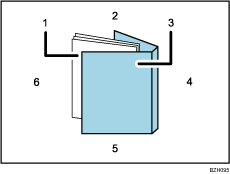
Book block
The bulk of the booklet, enclosed by the cover sheet.
Head edge
The edge that forms the booklet's top end.
Cover
The sheet enclosing the book block.
Spine
The booklet's bound edge.
Tail edge
The edge that forms the bottom end of the booklet.
Fore edge
The edge that forms the booklet's opening side.
The length/size of a cover sheet depends on the thickness of the book block's spine. For details about how to calculate approximate spine thickness and cover sheet length/size, see "Loading Cover Sheets into the Interposer of the Perfect Binder", Troubleshooting.
Place the originals for the book block in the ADF.
Load cover sheets into the perfect binder interposer.
For details, see "Loading cover sheets", Troubleshooting.
Select the paper tray for the book block sheets.
Press [Output/ Customize Function/ Finisher].
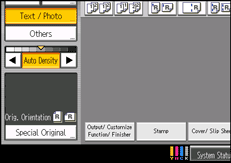
Press [Perfect Binding].
Select one of the binding positions.
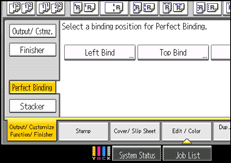
You can also specify the binding position and cut position.
Specify a binding position and a cut size if necessary.
After making all settings, press [OK].
Press the [Start] key.
Glue heating begins.
When the glue is hot enough, binding starts.
Press the delivery key when the status indicator goes off and the delivery key indicator lights up.
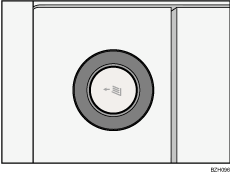
The lower left tray opens.
Remove bound booklets and close the lower left tray.

When you select perfect binding mode, Sort is automatically selected.
For details about paper sizes, weights, and the number of sheets that can be bound, and the volume that can be output to the perfect binder tray, see "Specifications for Perfect Binder", About This Machine.
For details about the paper weight that can be used as cover sheets, see "Specifications for Perfect Binder", About This Machine.
 |
 | Copyright (C) 2010 |
