












 Manuals
 Contents
 Previous
 Next
Next


| | | |
| |||
| |||
| | | |
| ManualsContentsPreviousNext | | |
When copying onto envelopes, specify the paper type and paper size.

Before using this function, specify the paper type and weight under Paper Type in Tray Paper Settings.
Place envelopes print side up on the multi bypass tray (tray 7).
While pinching the release lever, adjust the side fences to the size of the paper.
Set the end fence.
Press the elevator switch on the multi bypass tray (tray 7).
Select the multi bypass tray (tray 7) on the control panel.
Press the [ ] key.
Press [Program Custom Size].
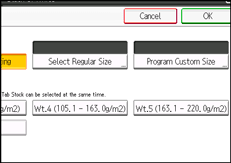
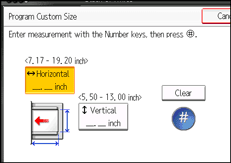
Specify the envelope size, and then press [OK] twice.
Place the originals, and then press the [Start] key.

When placing an original on the exposure glass, place the original with the bottom line aligned to the left scale.
When placing an original in the ADF, place the original with the bottom line inserted in the ADF.
To load envelopes in the multi bypass tray (tray 7), place them with the side you want to copy face-up. Be sure to unfold the flaps and position them opposite to the paper feed direction.
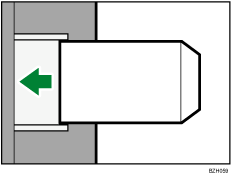
When entering the horizontal size for envelopes, including the opened-out flap in the measurement.
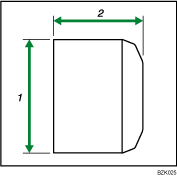
Vertical size
Horizontal size
You can load up to 10 envelopes (80  95 g/m2, 20 24 lb. Bond) in the multi bypass tray (tray 7) at the same time, without compressing them. Check the envelopes are not damp. Load only as much envelopes as can be held between the paper guides on the multi bypass tray (tray 7).
Check there is no air in the envelopes before loading.
To get better print quality, it is recommended that you set the right, left, top, and bottom print margin, to at least 15 mm (0.6 inch) each.
You cannot print envelopes with the Duplex function.
Load only one size and type of envelope at a time.
Before loading envelopes, flatten leading edges (the side going into the machine) by pressing a pencil or ruler across them.
Before loading envelopes, check they are rectangular in shape.
For details about supported envelope types, see "Envelopes", About This Machine.
 |
 | Copyright (C) 2010 |
