












 Manuals
 Contents
 Previous
 Next
Next


| | | |
| |||
| |||
| | | |
| ManualsContentsPreviousNext | | |
Use this function to copy to a selected size for each original size.

You cannot use the bypass tray with this function.
When the original is placed, the machine automatically enlarges or reduces the image to fit the size of the copy paper.
You can select the following combinations:
Original size |
Copy size |
|---|---|
A0 |
A0, A1, A2, A3, A4 |
A1 |
|
A2 |
|
A3 |
|
A4 |
|
B1 JIS |
B1 JIS, B2 JIS, B3 JIS, B4 JIS |
B2 JIS |
|
B3 JIS |
|
B4 JIS |
Press [User Auto R/E].
Check that the combination selected for User Auto Reduce / Enlarge is the one you want.
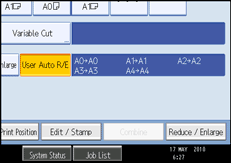

The default setting is to copy at the same size (full size). You can change the combination under Reproduction Ratio in User Tools. For details, see “Reproduction Ratio”.
Make sure that the original orientation setting matches the actual orientation of your original. For details, see “Original Orientation”.
You can specify the copy paper size in the range A0 to A4 or B1 to B4. However, you cannot change the size of the page image on an A-series original to fit B-series copy paper or vice versa.
 |
 | Copyright (C) 2010 |


