












 Manuals
 Contents
 Previous
 Next
Next


| | | |
| |||
| |||
| | | |
| ManualsContentsPreviousNext | | |
This section describes how to remove staple waste from the finisher.
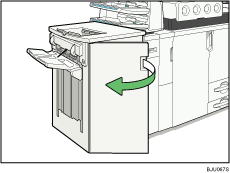
Open the front cover of the finisher.
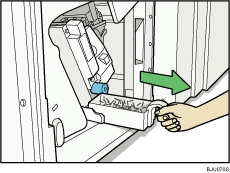
Pull out the staple waste box carefully, and then remove staple waste.
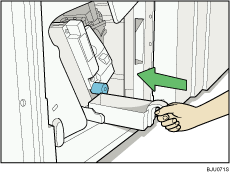
Reinstall the staple waste box.
Close the finisher front cover.

While " Waste Staple Receptacle is full." is displayed, you cannot use the staple function.
"Waste Staple Receptacle is full." is displayed until the waste staple box is reinstalled.
If the message is still displayed, reinstall the waste staple box.
 |
 | Copyright (C) 2008, 2009 |
