












 Manuals
 Contents
 Previous
 Next
Next


| | | |
| |||
| |||
| | | |
| ManualsContentsPreviousNext | | |
This section describes what to do when paper larger than B4 JIS or 81/2" × 14" is not properly aligned or falls from the output tray.
Press the [Suspend/Resume] key.
The key lights up.
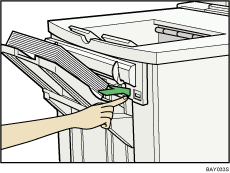
Remove the prints.
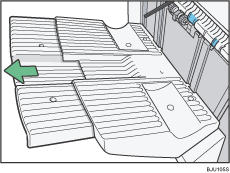
Pull out the finisher shift tray's extension.
Set the auxiliary tray by aligning the protrusion on the under side of the auxiliary tray with the holes on the tray extension.
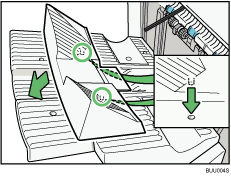

When you have finished using the auxiliary tray, hang it on the manual holder using the hook on the under side of the tray.
 |
 | Copyright (C) 2008, 2009 |
