




When Using the Folding Unit Tray
Use the following procedure to attach the large Z-fold support tray for Folding Unit to the Folding Unit Tray.
If the paper fed to the output tray is still not aligned even with the large Z-fold support tray for Folding Unit attached, attach the small Z-fold support tray for Folding Unit as well.
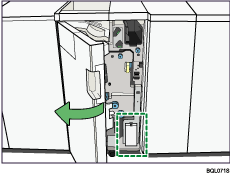
 Open the front cover of the Folding Unit and remove the large Z-fold support tray (located at the bottom of the Folding Unit).
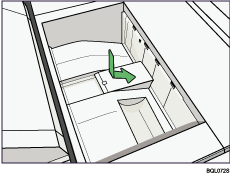
 Position the large Z-fold support tray flush against the end fence in the slope of the Folding Unit Tray.

When you have finished with the large Z-fold support tray, open the front cover of the Folding Unit and hang it back up on the stowage hook.


