




Folding positions
The following table shows the folds that this printer can apply to prints.
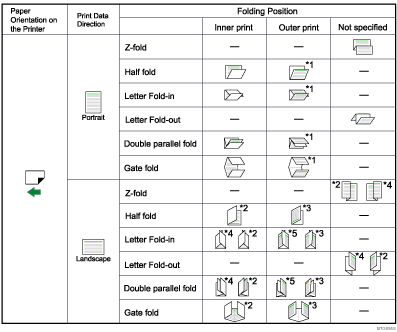
*1 To have prints delivered in this format, you must select [On] for [Eject Face-up] and specify the appropriate fold pattern.
*2 To have prints delivered in this format, you must select landscape in [Page Setup] and specify the appropriate fold pattern.
*3 To have prints delivered in this format, you must select both landscape in [Page Setup] and [On] for [Eject Face-up] and specify the appropriate fold pattern.
*4 To have prints delivered in this format, you must select landscape in [Page Setup], select [180 degree] in [Image Rotation], and specify the appropriate fold pattern.
*5 To have prints delivered in this format, you must select both landscape in [Page Setup], select [180 degree] in [Image Rotation], and [On] for [Eject Face-up] and specify the appropriate fold pattern.

Gate-fold and multi-sheet fold cannot be applied to coated paper.
With some applications, the fold direction of the output might be the opposite of the specified direction when landscape is selected for the Print data direction.
For details about which sizes and types of paper are compatible with which fold or multifold, see "Appendix", About This Machine.
For details about [Page Setup] and Orientation, see "Changing Paper Setups".


