




Changing Paper Setups
Use the following procedure to display the dialog box where you can change the paper settings.
 Open the document that you want to print.
 Select [Page Setup].
 Check that this printer is selected in the [Format for:] list, and then change the paper-related settings as necessary.
If the printer you are using is not selected in the [Printer:] list, click the list and then select the printer.
 Change any other settings as necessary, and then click [OK].

If certain combination of staple, punch, and fold are specified, [Orientation] in [Page Setup] must also be specified. You can specify one of the following three orientations:
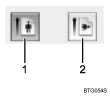
Portrait
Landscape
The content of the [page setup] dialog box will differ depending on the application or operating system. For details, see the manual or help files provided with your Macintosh computer.

