




Punch position
The specified punch position varies depending on paper feed and print data orientation. The following table shows punch positions:

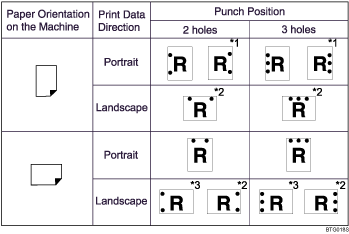

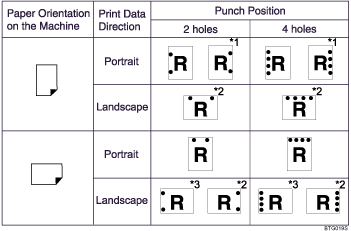
*1 To have prints delivered in this format, you must select [180 degrees] in [Image Rotation] and specify the punch holes pattern.
*2 To have prints delivered in this format, you must select landscape in [Page Setup] and specify the punch holes pattern.
*3 To have prints delivered in this format, you must select landscape in [Page Setup], select [180 degree] in [Image Rotation], and specify the punch holes pattern.

If you want to use the punch function in combination with duplex printing, you must specify a punch position that is compatible with the binding pattern and duplex position you have specified.
If you want to use the punch function in combination with letterhead printing, you must specify a punch position that is compatible with the binding pattern and paper orientation you have specified.
Punch positions will vary slightly from page to page as holes are punched into each sheet individually.
The number of holes that can be punched varies according to country.
For details about [Page Setup] and Orientation, see "Changing Paper Setups".
For details about paper sizes that can be punched, see "Appendix", About This Machine.
For details about printing methods, see the printer driver Help.


