




Staple position
The specified staple position varies depending on paper size, type, quantity and feed orientation. The following table shows staple positions:
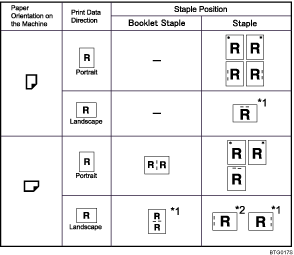
*1 Select landscape in [Orientation] under [Page Setup].
*2 Select landscape in [Orientation] under [Page Setup] and [180 degree] in [Image Rotation].

If you want to use the staple function in combination with duplex printing, you must specify a staple position that is compatible with the binding pattern and duplex position you have specified.
If you want to use the staple function in combination with letterhead printing, you must specify a staple position that is compatible with the binding pattern and paper orientation you have specified.
When center staple is set, the fore edge of prints can be cut using the optional trimmer.
Empty the trimmer tray if prints are ejected with waste paper stuck to them. For details, see "Removing Waste Paper", Troubleshooting.
For paper sizes and maximum numbers of sheets available for stapling, see "Appendix", About This Machine.
For details about [Page Setup] and Orientation, see "Changing Paper Setups".


