












 Manuals
 Contents
 Previous
 Next
Next


| | | |
| |||
| |||
| | | |
| ManualsContentsPreviousNext | | |
This section describes what to do when paper runs out and needs reloading.

|

When removing paper rolls, lift the paper holders on either side of the paper roll before removing. Do not lift one side only. This could damage the machine.
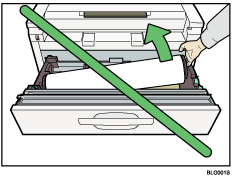

If the original hanger (optional) is installed, remove it before pulling out the paper roll tray or cut paper tray.
For paper types and sizes that can be loaded in the paper roll tray and cut paper tray, see "Recommended Paper Sizes and Types", About This Machine.
For details about changing the paper size in the paper roll tray or cut paper tray, see "Changing the Paper Size".
To load paper in the bypass tray, see "Copying from the Bypass Tray", Copy/Document Server Reference.
 |
 | Copyright (C) 2008 |

