












 Manuals
 Contents
 Previous
 Next
Next


| | | |
| |||
| |||
| | | |
| ManualsContentsPreviousNext | | |
The combination chart given below shows which modes can be used together.
Blank: These modes can be used together.
×: These modes cannot be used together. The first mode selected will be the mode you are working in.
 : These modes cannot be used together. The second mode selected will be the mode you are working in.
The following shows the combinations of functions:
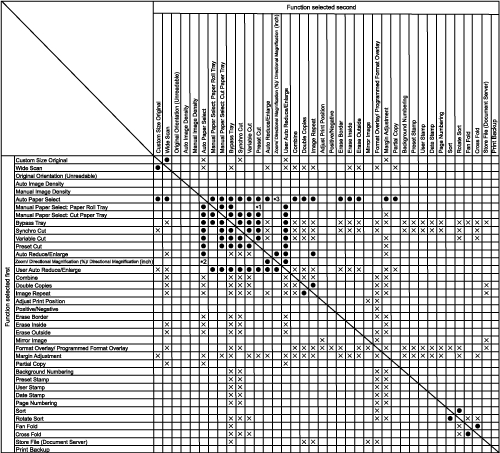
*1 When there is no appropriate preset cut size paper in the selected tray, the function selected first has priority.
*2 When Directional Magnification (%) or Directional Magnification (inch) is selected, the function selected first has priority.
*3 When Directional Magnification (%) or Directional Magnification (inch) is selected, the function selected second has priority.
 |
 | Copyright (C) 2008 |
