












 Manuals
 Contents
 Previous
 Next
Next


| | | |
| |||
| |||
| | | |
| ManualsContentsPreviousNext | | |
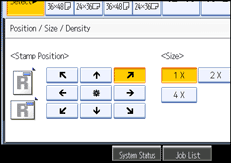
Changes the stamp position, size and density.
Press [Edit / Stamp].
Press [Stamp].
Press [Preset Stamp].
Press [Change] under Position / Size / Density.
Select the position, size, and density of the stamp, and then press [OK].
 |
 | Copyright (C) 2008 |
