












 Manuals
 Contents
 Previous
 Next
Next


| | | |
| |||
| |||
| | | |
| ManualsContentsPreviousNext | | |
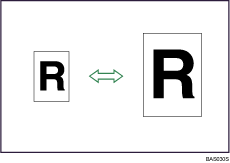
This function allows you to reduce or enlarge images by selecting a preset ratio.
You can register up to three frequently used reproduction ratios other than the preset Reduce/Enlarge ratios.
Metric version
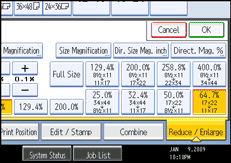
Enlargement ratios: 141.4%, 200.0%, 282.8%, 400.0%
Reduction ratios: 25.0%, 35.4%, 50.0%, 70.7%
Inch version
Engineering
Enlargement ratios: 129.4%, 200.0%, 258.8%, 400.0%
Reduction ratios: 25.0%, 32.4%, 50.0%, 64.7%
Architecture
Enlargement ratios: 133.3%, 200.0%, 266.7%, 400.0%
Reduction ratios: 25.0%, 33.3%, 50.0%, 66.7
Press [Reduce / Enlarge].
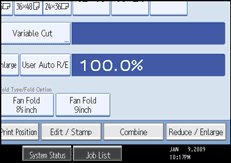
To select a preset ratio on the initial display, press the shortcut reduce/enlarge key.
Select a ratio, and then press [OK].
Place the originals, and then press the [Start] key.

Select one of the preset ratios based on the original size and paper size.
For details about the relationship between the original and paper sizes for preset ratios, see "Magnification Ratio Chart".
 |
 | Copyright (C) 2008 |
