












 Manuals
 Contents
 Previous
 Next
Next


| | | |
| |||
| |||
| | | |
| ManualsContentsPreviousNext | | |
The machine automatically detects the original size and then selects an appropriate reproduction ratio based on the paper size you select.
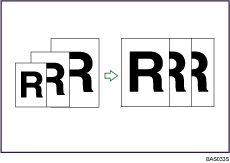

You cannot use the bypass tray with this function.
This is useful to copy different size originals to the same size paper.
To ensure the print result you require is produced, specify Original Orientation before using Auto Reduce/Enlarge.
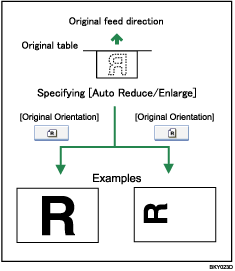
The original sizes and orientations you can use with this function are as follows:
Metric version
A0 , A1
, A1 , A2, A3, A4, B1JIS, B2JIS, B3JIS, B4JIS
Inch version
Engineering
E (34" × 44"), D (22" × 34"), C (17" × 22"), B (11" × 17"), A (81/2" × 11"), 81/2" × 14"
Architecture
E (36" × 48"), D (24" × 36"), C (18" × 24"), B (12" × 18"), A (9" × 12")
Others
81/2" × 13", 30" × 21", 30" × 42"
Press [Auto Reduce / Enlarge].
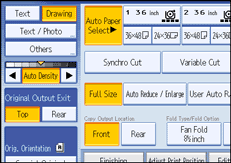
Select the paper size.
Place the originals, and then press the [Start] key.

The machine selects one of the following ratios:
Metric version
400.0%, 282.8%, 200.0%, 141.4%, 100.0%, 70.7%, 50.0%, 35.4%, 25.0%
Inch version (Engineering)
400.0%, 258.8%, 200.0%, 129.4%, 100.0%, 64.7%, 50.0%, 32.4%, 25.0%
Inch version (Architecture)
400.0%, 266.7%, 200.0%, 133.3%, 100.0%, 66.7%, 50.0%, 33.3%, 25.0%
Make sure the Original Orientation setting matches the actual orientation of your original.
 |
 | Copyright (C) 2008 |
