




Heftposition
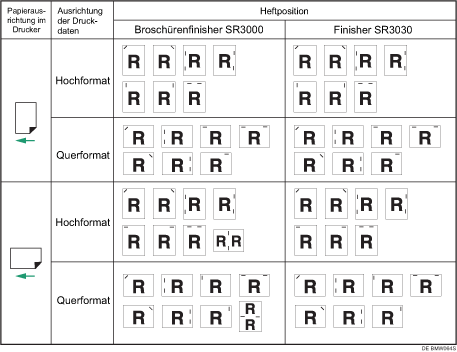
Die festgelegte Heftposition variiert abhängig vom Papierformat, dem Typ, der Menge und der Einzugsrichtung. Die folgende Tabelle zeigt die Heftpositionen:
Heftposition
Heftkapazität (Broschürenfinisher SR3000)
Papierformat |
Heftkapazität |
|---|---|
A3 |
30 |
A4 |
50 |
 , B4 JIS
Heftkapazität (Finisher SR3030)
Papierformat |
Heftkapazität |
|---|---|
A3 |
30 |
A4 |
50 |
Gemischtes Format
Gemischtes Papierformat |
Heftkapazität (Broschürenfinisher SR3000) |
Heftkapazität (Finisher SR3030) |
|---|---|---|
A3 |
22 |
30 |
B4 JIS |
22 |
30 |
11" × 17" |
22 |
30 |
81/2" × 14" |
22 |
30 |

Wenn zweiseitiger Druck ausgewählt ist, passen Sie die Heftposition an die Bindungsrichtung an.
Wenn Sie die Ausgabe gleichzeitig lochen, geben Sie dieselbe Seite an.
Nähere Informationen zu den Druckverfahren finden Sie in der Druckertreiber-Hilfe.

