




Using [Mask type:]
You can embed patterns and text in a document by setting in the printer driver to prevent unauthorized copying.
Setting [Mask type:] in the printer driver
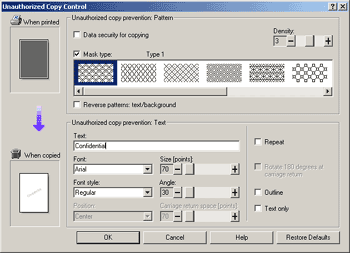
Select a pattern from [Mask type:], and then enter text in the [Text:] box.
You can set only [Text:], but [Mask type:] and [Text:] must be set together.
Printing a document using [Mask type:]
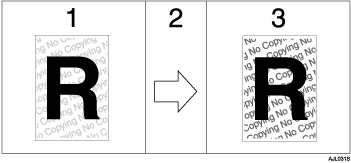
The pattern and text you have set is printed palely.
The document is copied in copiers/multifunction machines.
The pattern and text you have set appear clearly.

Only the RPCS printer driver is supported.
You cannot partially embed patterns and text strings in a document.
To make the embedded pattern clear, set the character size at least 50 pt (preferably 70 to 80 pt) and character angle to between 30 and 40 degrees.
Printing with background patterns and text may be slower than normal printing.
For details about setting [Mask type:], see the printer driver Help.

