












 Manuals
 Contents
 Previous
 Next
Next


| | | |
| |||
| |||
| | | |
| ManualsContentsPreviousNext | | |
By selecting the paper type you want to load, the printer performs better. You can select from the following paper types:
Plain Paper, Recycled Paper, Special Paper, Color Paper, Letterhead, Transparency (OHP transparency), Envelope, Preprinted, Thick Paper
You can select custom paper type settings made using Web Image Monitor.

Be sure to select the paper type when you load thick paper, envelopes, or OHP transparencies in the bypass tray.
The paper type selected using the printer driver overrides that selected using the control panel.
Be sure to set a paper type using the control panel of the printer as the following procedure. If you set a paper type only by the printer driver, printing result might not be appropriate.
Press the [Menu] key.
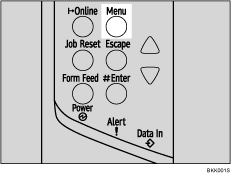
The [Menu] screen appears.
Press the [ ] or [
 ] key to display [Paper Input], and then press the [
 Enter] key.
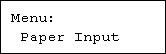
Press the [] or [] key to display [Paper Type], and then press the [ Enter] key.
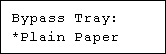
Press the [] or [] key to display [Bypass Tray], and then press the [ Enter] key.
Press the [] or [] key to select the paper type, and then press the [ Enter] key.
Press the [Online] key.
The initial screen appears.

The following paper types cannot be printed on both sides:
Special Paper, Color Paper, Transparency (OHP transparency), Envelope, Preprinted, Thick Paper
 |
 | Copyright (C) 2008 |
