












 Manuals
 Contents
 Previous
 Next
Next


| | | |
| |||
| |||
| | | |
| ManualsContentsPreviousNext | | |
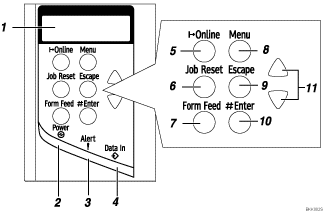
Display
Shows the current status of the printer and error messages.
Power indicator
Is on while the printer power is on.
Is off when the power is turned off or while the printer is in Energy Saver mode.
Alert indicator
Blinks or lights up whenever any printer error occur. A message describing the cause of the error also appears on the display.
Data In indicator
Blinks while the printer is receiving data from a computer.
Is on if there is data to be printed.
[Online] key
Press this key to switch the printer between online and offline.
[Job Reset] key
When the printer is online, press this key to cancel any ongoing print jobs.
See "Canceling a Print job", Software Guide.
[Form Feed] key
If the printer is offline, press this key to print all the data left in the printer's input buffer.
This does not work if the printer is online.
[Menu] key
Press this key to make and check the current printer settings.
[Escape] key
Press this key to return to the previous condition on the display.
[ Enter] key
Press this key to execute menu items selected on the display.
Press this key to clear some errors.
[ ] [
] [ ] keys
Press keys to increase or decrease values on the display when making settings.
Keep the key pressed to quicken scrolling, and increase or decrease values on the display in units of 10.
 |
 | Copyright (C) 2008 |
