












 Manuals
 Contents
 Previous
 Next
Next


| | | |
| |||
| |||
| | | |
| ManualsContentsPreviousNext | | |
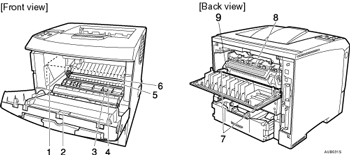
Toner Cartridge (Print Cartridge)
Includes toner and a photo conductor unit.
When "Replace Print Cartridge" appears on the display, replace this unit.
Front Cover
Open this cover when accessing the inside of the printer.
Guide Board
Open this board to remove misfed paper.
Registration Roller
Feeds the paper. If it becomes dirty, clean it.
See Cleaning the Printer.
Transfer Roller Cover
Open this cover when replacing a transfer roller.
Transfer Roller
When "Replace Maintenance Kit" appears on the display, replace this roller.
Fusing Unit Lock Levers
Lift these levers when replacing the fusing unit.
Fusing Unit
Fuses the image onto paper.
When "Replace Maintenance Kit" appears on the display, replace this unit.
Envelope lever
Use this lever if envelopes become wrinkled during printing. Using the envelope lever can improve print quality.
 |
 | Copyright (C) 2008 |
