


Mottling (Paper with Indentations and Other Textured Paper)
Transfer error (mottling) occurs on indentations of the paper surface.
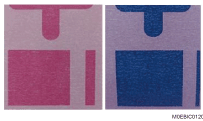
Cause:
When the image (intermediate) transfer pressure is high, the toner on the intermediate transfer belt is positioned lower and the adhesion is higher, resulting in transfer error to the indentations of the paper at the paper transfer unit.
Solution:
(a) Execute Toner Refreshing.
 Print 30 sheets of solid-fill images with 100% density for each color of CMYK.

The page yield decreases as a side effect.
(b) Adjust the image transfer output.
If the paper is not registered as custom paper, register the brand of the paper.
 In [Detailed settings] for the custom paper you are using, select 1212: [Image Transfer Output], and then decrease the value by 5.
1212-02: Image Transfer Output: FC/FCS: Black
1212-03: Image Transfer Output: FC/FCS: Cyan
1212-04: Image Transfer Output: FC/FCS: Magenta
1212-05: Image Transfer Output: FC/FCS: Yellow
Decreasing the image transfer output may cause a faint image. If the image is too faint, adjust the value between "-5" and "-3".
If the problem persists after executing Toner Refreshing and image transfer output adjustment, go to the (d) procedure for changing the AC transfer mode setting.
(c) Change the paper brand
Assign the textured paper with the closest paper thickness from the media library.
(d) changing the AC transfer mode setting.
In [Detailed settings] for the custom paper you are using, set 1218-01: [Paper Transfer Output] to [Textured Paper].
In accordance with the problem, perform the solution as follows.
Transfer error on indentations of the paper
Change the paper transfer voltage to "+2"
1214-07: Paper Transfer Output: FC/FCS: Side 1: AC
1214-08: Paper Transfer Output: FC/FCS: Side 2: AC
Print the image. Has the problem been resolved?
Yes
Finished!
No
Adjust the paper transfer voltage while printing and checking the image.
White spots or toner blasting
Change the paper transfer voltage to "-2"
1214-03: Paper Transfer Output: BW: Side 1: AC
1214-04: Paper Transfer Output: BW: Side 2: AC
1214-07: Paper Transfer Output: FC/FCS: Side 1: AC
1214-08: Paper Transfer Output: FC/FCS: Side 2: AC
1214-11: Paper Transfer Output: FCS: Side 1: AC
1214-12: Paper Transfer Output: FCS: Side 2: AC
Print the image. Has the problem been resolved?
Yes
Finished!
No
Adjust the paper transfer voltage while printing and checking the image.