


Thin Paper may have Problems such as Curling, Stacking Error, Paper Jam, and Sheets being Bent at the Corners
Thin paper and other paper that requires high fusing temperatures are prone to curl due to the large temperature difference between the fused and pressurized sides.
As a result, the following problems may occur when delivering the paper.
Paper curling
Not stacked properly
Paper jams
Folded edges
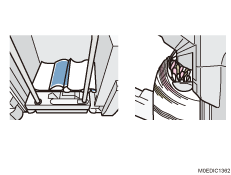
Solution:

You need to register the paper as custom paper in advance.
 In [Detailed settings] for the custom paper you are using, select 1321: [Correct Paper Curl], and then set [Correction Mode] to [U Curl Correction Level: Large] or [П Curl Correction Level: Large] according to the curl.
 Print the image. Has the problem been resolved?
Yes | Finished! |
No | Go to the next step. |
 Is the finisher shift tray selected to the output tray?
Yes | Proceed to Step 6. |
No | Go to the next step. |
 Select the finisher shift tray to the output tray.
 Print the image. Has the problem been resolved?
Yes | Finished! |
No | Go to the next step. |
 In [Detailed settings] for the custom paper you are using, select 1232: [Fusing Temperature], select [Heat Roller Temp], and then decrease the value in the following corresponding settings by 5°C.
1232-01: Fusing Temperature: BW/FC/FCS: Heat Roller Temp
1232-06: Fusing Temperature: FCS: Heat Roller Temp: Clear/Special
1232-07: Fusing Temperature: FCS: Heat Roller Temp: White
1232-08: Fusing Temperature: FCS: Heat Roller Temp: Metallic
1232-26: Fusing Temperature: S: Heat Roller Temp: Clear/Special
1232-27: Fusing Temperature: S: Heat Roller Temp: White
1232-28: Fusing Temperature: S: Heat Roller Temp: Metallic
1232-46: Fusing Temperature: BW/FC/FCS: Fuser Setting HQ: Heat Roller Temp
1232-51: Fusing Temperature: FCS: Fuser Setting HQ: Heat Roller Temp: Clear/Special
1232-52: Fusing Temperature: FCS: Fuser Setting HQ: Heat Roller Temp: White
1232-53: Fusing Temperature: FCS: Fuser Setting HQ: Heat Roller Temp: Metallic
1232-71: Fusing Temperature: S: Fuser Setting HQ: Heat Roller Temp: Clear/Special
1232-72: Fusing Temperature: S: Fuser Setting HQ: Heat Roller Temp: White
1232-73: Fusing Temperature: S: Fuser Setting HQ: Heat Roller Temp: Metallic
 Print 20 or more sheets. Is the condition of the image acceptable?
Yes | Go to the next step. |
No | No further improvement is likely. |
 Check if the toner fusibility is within the permissible range.
The required level of fusibility is as follows.
The printed image does not come off.
The toner does not come off even if it is lightly rubbed by a nail.
The toner does not come off even if the image is wiped with an optical cloth.
Yes | Go to the next step. |
No | No further improvement is likely. |
 Has the paper output improved?
Yes | Finished! |
No | Repeat Steps 6 to 9. If the problem still persists, contact your service representative. |
Select "Clear/Special" when using Neon Yellow, Neon Pink, or Invisible Red. Select "Metallic" when using Gold or Silver.