


Sheets Are Not Aligned
The trailing edge of the sheets delivered to the stacker tray are aligned by the paddle. If the delivered sheets are flat, the friction at the trailing edge increases and affects the alignment of the sheets parallel to the paper feed direction. Also, when the leading edge stopper stops the leading edge of paper, the paper may be stopped with the leading edge protruding, resulting in horizontal misalignment when stacked.
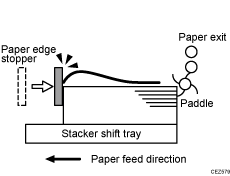
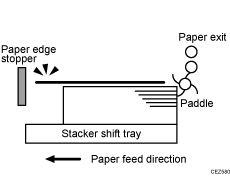
Occurrence conditions:
Paper with thickness of Paper Weight 1 (52.3 to 63 gsm) in low temperature and humidity environments
Upward curl
Solution:
Straighten out the sheet.
 Load the sheets the other way up.
 Print the image. Has the problem been resolved?
Yes | Finished! |
No | Go to the next step. |
 In [Detailed settings] for the custom paper you are using, select 1321: [Correct Paper Curl], and then specify "П Curl Correction Level: Small".
 Print the image. Has the problem been resolved?
Yes | Finished! |
No | Go to the next step. |
 In [Detailed settings] for the custom paper you are using, select 1321: [Correct Paper Curl], and then specify "П Curl Correction Level: Large".
 Print the image. Are the problems of trailing edge remaining and curling resolved?
Yes | Finished! |
No | Go to the next step. |
 Is the paper curled downward?
Yes | Cannot be solved by this flow. |
No | Load the sheets the other way up again, and then repeat Step 3 to 6. If the problem still persists, contact your service representative. |