


Sheets Are Curled
Cause:
With sheets that are curled downward and sheets that are not curled, the leading edge of the sheet being delivered rubs against the top sheet of the stack, there being no air gap between the sheets, and the sheet being delivered is therefore prone to get stuck. Consequently, the trailing edge of the sheet being delivered is left in the paper exit, and the next sheet to be delivered slips under the sheet still in the paper exit and bends back.
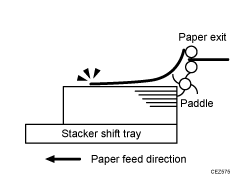
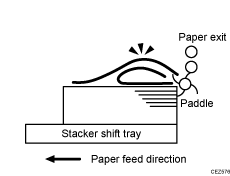
Occurrence conditions:
A4 or larger coated paper weighing up to 135 g/m2 (50 lb. Cover) is used.
When using thin paper with a thickness of 1.
Solution:
Straighten out the sheet.
 Load the sheets the other way up.
 Print the image. Has the problem been resolved?
Yes | Finished! |
No | Go to the next step. |
 In [Detailed settings] for the custom paper you are using, select 1321: [Correct Paper Curl], and then specify "П Curl Correction Level: Small".
 Print the image. Has the problem been resolved?
Yes | Finished! |
No | Go to the next step. |
 In [Detailed settings] for the custom paper you are using, select 1321: [Correct Paper Curl], and then specify "П Curl Correction Level: Large".
 Print the image. Are the problems of trailing edge remaining and curling resolved?
Yes | Finished! |
No | Go to the next step. |
 Is the paper curled downward?
Yes | Cannot be solved by this flow. |
No | Load the sheets the other way up again, and then repeat Step 3 to 6. If the problem still persists, contact your service representative. |