


Horizontal Streaks Occur When Loading a Full-Page, Solid-Fill Sheet
Cause:
Due to the sheets that have been fed, paper dust accumulates, and can come into contact with the sheets, causing thin scratches parallel to the paper feed direction (horizontal streaks).
This is prone to occur especially when printing full-page solid-fill sheets.
Solution:
Clean the paper guides (in the two areas as shown below).
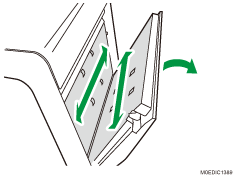
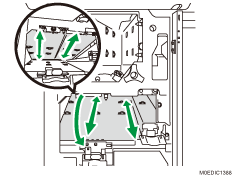
Wipe the paper guides with a soft dry cloth.
If the stain cannot be removed with a dry cloth, wipe with a cloth dampened with water and wrung well. Then wipe with a dry cloth until no moisture remains.