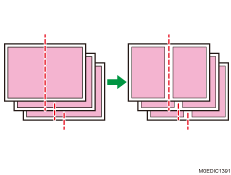
When Using the Booklet Finisher, a Paper Jam Occurs with only the Front Cover Delivered
Cause:
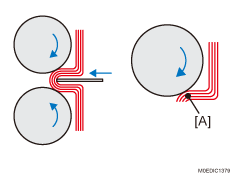
When performing booklet folding, the folding roller holds the folds on the paper stack from top and bottom, and delivers it while folding the paper at the center.
During this time, the front cover is delivered by the friction between the folding roller and paper, while other sheets are delivered by the friction between them.
However, the friction between the sheets (A) is weak for paper with high image density, such as those with solid fills, resulting in reduced power to deliver sheets other than the front cover. Consequently, paper slip occurs with the delivery of only the front cover while other sheets remain in the booklet tray, causing a paper jam (JAM618 or JAM 641).
Occurrence conditions:
A high-image-density image (such as a solid fill) is on the folds of paper.
Printing in a low temperature and low humidity environment.
Solution:
Select magazine as the booklet folding type.
Set the binding margin to 5 mm (0.2 inches) or longer. (Set the binding margin to 5 mm (0.2 inches) at the left on the front and 5 mm (0.2 inches) at the right on the back.)