


Stapled Sheets Are Scratched or Jammed
Cause:
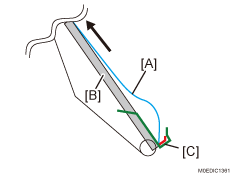
In the binding process, when thin, coated paper [A] is discharged from the staple tray [B], as the staple tray that pushes and lifts up the trailing edge of the paper is at a steep angle (55°), it results in a difference in linear speed between the leading edge and trailing edge, making it buckle; the release pawl [C] is unable to lift it up, resulting in scratches on the paper and/or jams.
Occurrence conditions:
High humidity
Paper bends easily (in the cross-grain direction)
Using long sheets of paper
Using few sheets of paper
Solution:
Stapled sheets are scratched or jammed.
 Check if the paper thickness is Paper Weight 2 or less.
Yes | Go to the next step. |
No | The problem is likely to be a problem other than the problem described here. |
 Check if the paper is curled downward.
Yes | Go to the next step. |
No | The problem is likely to be a problem other than the problem described here. |
 In [Detailed settings] for custom paper, set 1321: [Correct Paper Curl].
Select "Large" or "Small" depending on the degree of decurling required.
 Check if the problem of scratching or jamming is resolved.
Yes | Finished! |
No | The problem is likely to be a problem other than the problem described here. |