


Not Stacked Properly (Carbonless Paper of Paper Weight 0/1)
Cause:
The Z-fold support tray was attached to lower the angle against the exit tray and reduce the transport resistance, but as a result, the jogger could not reach the paper surface to perform alignment in the direction of the paper width.
The width alignment cannot be performed with the Z-fold support tray attached
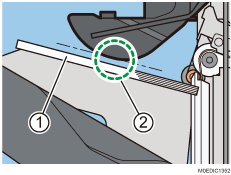
Stacked sheets
Jogger cannot reach the paper surface
The Z-fold support tray's width is too narrow, so both edges of the paper protrude and droop from the Z-fold support tray. The non-alignment becomes severe especially with long edge feed (LEF) of sheets with curls on sides in the cross-grain direction.
Range of paper drooping in the direction of the paper width with the Z-fold support tray attached:
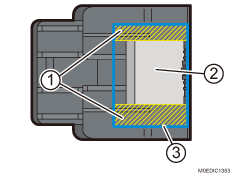
Drooping part
Z-fold support tray
A4 LEF stacked paper
Due to the Z-fold support tray, the contact position of the leading edge of the paper and exit tray becomes farther, and the timing for the trailing edge of the paper to drop is delayed. If a side of the jogger comes into contact with the delivered paper, the paper goes out of alignment in the direction of the paper width, and the alignment accuracy is further worsened.
Solution:
Attach an Output banner sheet tray.
To attach an output tray for banner sheet, contact your service representative.