


The Leading Edge of Paper Rolls Up (JAM607 / JAM609)
Cause:
A3 or larger paper with a thickness of Paper Weight 1 (cross-grain direction) or Paper Weight 2 (grain direction) are delivered with a face-up curl (approximately 15 mm (0.6 inches)), resulting in the leading edge of the paper riding up and rolling upward.
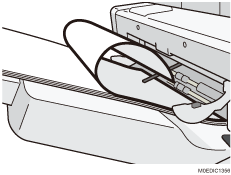
On the other hand, the leading edge of paper with a thickness of Paper Weight 0 may droop, resulting in a steep contact angle with the output tray and the leading edge of paper rolling downward. Such a face-down curl is prone to occur especially when delivering the paper face up.
If the face-up curl is severe (15 mm (0.6 inches) or more), the leading edge of the paper will ride up and roll upward.
The leading edge of the paper curls downward
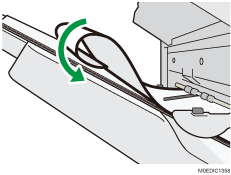
The leading edge of the paper rides up and curls downward
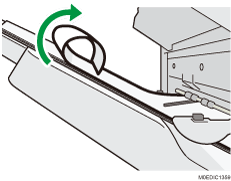
The sheets that are delivered thereafter collide with the rolled paper, blocking the paper exit due to a stacking error, and resulting in a paper jam (JAM607 / JAM609).
Solution:
 For paper with a thickness of Paper Weight 0, attach Output banner sheet tray.
 Print the image. Has the problem been resolved?
Yes | Finished! |
No | Go to the next step. |
 In [Detailed settings] for custom paper, select 1321: [Correct Paper Curl], and then specify [Correction Mode].
To correct curls facing up, specify "U Curl Correction Level: Large" or "U Curl Correction Level: Small".
To correct curls facing down, specify "П Curl Correction Level: Large" or "П Curl Correction Level: Small".
 Print the image. Has the problem been resolved?
Yes | Finished! |
No | If the problem still persists, contact your service representative. |

If the curl cannot be decurled, deliver the paper either face down or face up according to the curl.