


J033/J082 Appears
Cause:
This occurs when the paper and conveyor belt fail to come into contact closely enough, resulting in paper misfeeds.
J033: Paper jam before reaching the fusing exit sensor
J082: Paper jam due to paper staying at the paper feed sensor
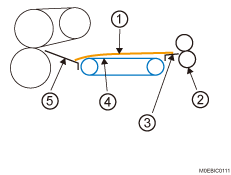
Jammed Paper
Image Transfer Roller
Paper Transfer Unit Exit Guide
Transport Belt
Fusing Unit Entrance Lower Guide
Occurrence conditions:
Paper with a thickness equivalent to Paper Weight 7 is used
When using card stock, metallic paper, envelopes, and small-sized papers.
When using papers that are folded, such as cards.
Paper with its grain parallel to the paper feed direction is used.
Paper is curled backward
Solution:
(a) When using papers other than envelopes
 Change the orientation of the paper in the tray.
 Print the image. Has the problem been resolved?
Yes | Finished! |
No | Go to the next step. |
 Turn the paper in the paper tray upside down.
 Print the image. Has the problem been resolved?
Yes | Finished! |
No | Go to the next step. |
 Reload with new paper.
 Print the image. Has the problem been resolved?
Yes | Finished! |
No | There is no other solution, so change the paper size (to 300 mm or longer) or change the paper brand. Contact your service representative. |
(b) If using envelopes
Set the envelopes by stiffening them so that they bend downwards.
Print the image. Has the problem been resolved?
Yes | Finished! |
No | Go to the next step. |
Set the envelopes by stiffening them so that they bend upwards.
Print the image. Has the problem been resolved?
Yes | Finished! |
No | Go to the next step. |
Close the envelope flap.
Print the image. Has the problem been resolved?
Yes | Finished! |
No | Contact your service representative. |