


Stains on the Paper Edges
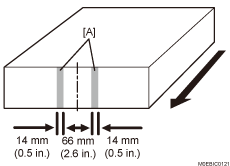
[A]: Example of stains (when the transfer roller's position is stained)
Cause:
Toner, paper dust, or other particles adhering to the roller or guide adheres to the edges of the paper, causing stains on the paper edges.
Occurrence conditions:
When printing on long paper
When printing images covering high image areas
When printing in full color
When printing jobs with many pages
When the image contains halftones
Solution:
 If the Buffer Pass Unit is attached, go to the next step.
If not, go to Step 5.
 Check to see if the stain is located at an area between 33 mm (1.3 inches) and 14 mm (0.6 inches) from the center of the paper.
Yes | Go to the next step. |
No | Proceed to Step 5. |
 Fan the paper and clean the paper edges. (See Clean the Paper Edges) Or clean the pipe cooling unit's transfer roller and guide plates. (See Cleaning the Buffer Pass Unit)
 Print the image. Has the problem been resolved?
Yes | Finished! |
No | Go to the next step. |
 Check whether the stains on the paper edges occurred during duplex printing or single-sided printing.
Duplex printing | Go to the next step. |
Single-sided printing | Proceed to Step 8. |
 Check if the stains are located in the area 25 mm (1 inches), 68 mm (2.7 inches), 113 mm (4.4 inches), or 146 mm (5.7 inches) away from the center in the paper feed direction.
Yes | Go to the next step. |
No | Proceed to Step 8. |
 Clean the ribs of the duplex guide plate. (See Cleaning the Turned-Over Delivery Unit)
If the problem persists even after the cleaning, it may be caused by the paper, so use different paper or print on paper that assumes that its edges will be cut.
Adjust the line speed for decurling
If the paper is not registered as custom paper, register the brand of the paper.
In [Detailed settings] for custom paper, check the decurling level in 1321-01: [Correction Mode]. Decrease the line speed to match the decurling level.
If set to "Correction Off" | 1321-02: Correct Paper Curl: Speed Adjustment: Decurler: Correction Off |
If set to "Correction Weak " | 1321-03: Correct Paper Curl: Speed Adjustment: Decurler: Correction Weak |
If set to "Correction Strong " | 1321-04: Correct Paper Curl: Speed Adjustment: Decurler: Correction Strong |
Print the image. Has the problem been resolved?
Yes | Finished! |
No | Start over from Step 2. If the problem persists even after decreasing the value to the lower limit, there is no other solution. |

If the stains on the edges occur at the trailing edge of the paper due to the decurler, adjust the line speed for decurling.
Decreasing the line speed too much may cause creases, scratches, or paper jams with thin paper.