


Cleaning the Cooling Belt of the Turned-Over Delivery Cooling Unit

For details on removing Fuser Unit and cleaning, see "162 Left Drawer: Cooling Belt".
Clean the cooling belt [A] of the turned-over delivery cooling unit as follows.
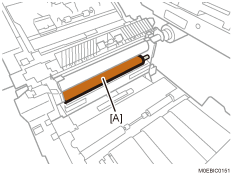
Since wax adheres to the machine's cooling belt, it is recommended to clean it with alcohol every 100K sheets of printing.
If toner stains or paper dust are found on the surrounding guide plates, clean the guide plates too.
 Remove the Fuser Unit.
 Using an alcohol-dampened cloth, wipe the cooling belt [A] back and forth 3 times in the direction of the belt width.
Be sure to wipe the part completely.
 Rotate the drive roller [A] approximately 30°, and then wipe the cooling belt [B].
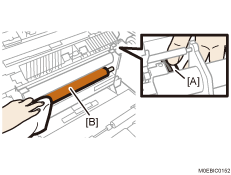
 Repeat steps 2 and 3 16 times.
By repeating the 30° rotation and wiping 16 times, you can clean the entire cooling belt.