


Cleaning the Machine's Transfer Unit

For details on cleaning, see "158 Right Drawer: Paper Dust Case", "120 Paper Transfer Unit: Paper Path" and "155 Right Drawer: Paper Path 1".
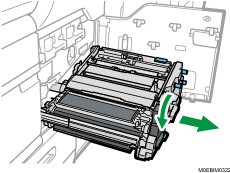
 Lower the B5 lever, and pull out the right drawer unit toward you.
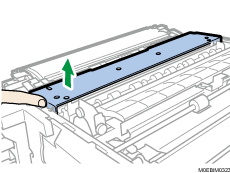
 Press the hook at the front with your finger, and lift up the cover to remove it.
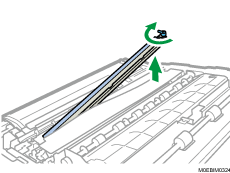
 Push and turn the lever on the paper dust collector clockwise, and remove it from the machine.
 Remove paper dust from the paper dust collector.

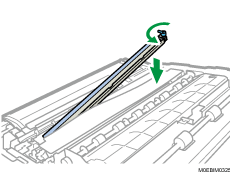
 Aligning the pins on the right and left sides of the paper dust collector with the holes on the drawer unit, attach the case back in its original position, and turn the lever counterclockwise to secure it.
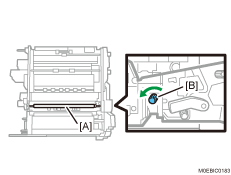
 Pressing a dry cloth against the driven transfer timing roller [A], wipe the surface of the roller while turning the knob [B].
 Lifting the paper transfer unit, remove it.
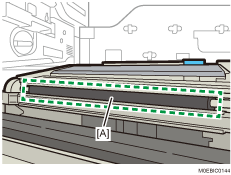
 Clean the drive transfer timing roller [A] with a dry cloth.
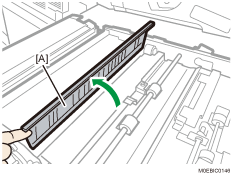
 Open the transparent guide plate [A], and then clean the guide plate.
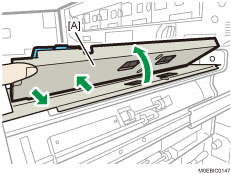
 Open the entrance guide plate [A], and then clean the guide plate.
 Lowering the lever, open the vertical transport paper feed guide plates.
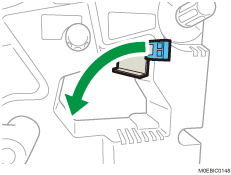
 Clean the guide plate.
