


Stains appear on the back of the paper approximately every 205 mm (8.1 inches) in the paper feed direction
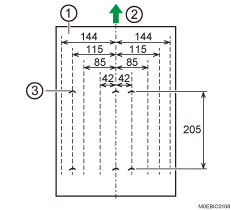
Back of paper
Paper feed direction
Stains on the back
Cause:
The paper dust and toner sticking to the pressure roller separation pawl slip through the plate, staining the back of the paper.
Solution:
Clean the pressure roller separation pawl.
For details, see Cleaning the Pressure Separation Pawls.