


White Bird Tracks
Bird-track-like white spots appear in the area around 10 mm (0.4 inches) from the trailing edge of the paper.
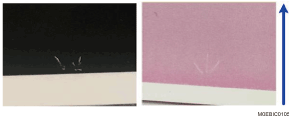
Cause:
This may occur if the transfer entrance guide plate is stained at low temperature and humidity.
Solution:
 Clean the transfer entrance guide plate.
For details, see Clean the Transfer Entrance Guide Plate
 Print the image. Has the problem been resolved?
Yes | Finished! |
No | Go to the next step. |
 Increase the temperature of the machine’s ambient environment.
Increase the temperature to approximately 20°C and humidity to approximately 30%.
 Print the image. Has the problem been resolved?
Yes | Finished! |
No | Go to the next step. |
 Using a ruler, measure the length of the area with white spots (excluding the margin).
 If the paper is not registered as custom paper, register the brand of the paper.
 In [Detailed settings] for the custom paper you are using, select 1239: [Margin], and then move the image closer to the trailing edge in the following setting according to the measured length
1239-01: Margin: BW/FC/FCS/S: Leading Edge
1239-03: Margin: FCS: Leading Edge: Clear/Special
1239-04: Margin: FCS: Leading Edge: White
1239-05: Margin: FCS: Leading Edge: Metallic
 Print the image. Has the problem been resolved?
Yes | Finished! |
No | No further improvement is likely. |