


Medaka (White Spots)
White dots or short lines appear, spaced at intervals of 189 mm (7.5 inches) in the direction of the paper feed.
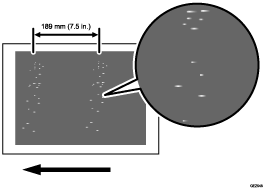
Cause:
The photoconductor unit is stained.
Solution:
 To identify the affected color, print three full-page, solid-fill A3 or DLT sheets for each of cyan, magenta, black, and green.

Because it is difficult to identify white spots on yellow, green is used instead of yellow.
 Detach the photoconductor unit of the affected color and check the drum surface. Is the surface stained?
Yes | Wipe the photoconductor unit surface with a clean dry cloth to remove the stain. In the [Machine: Maintenance] group on the [Operator Adjust.] menu, execute 0504: [Execute Cleaning Initial Setting for PCU]. Go to the next step. |
No | Replace the photoconductor unit. |
 Print the image. Has the problem been resolved?
Yes | Finished! |
No | Replace the PCU cleaning unit. |