


White Spots, Colored Streaks
White spots and colored streaks appear on solid-fill images.
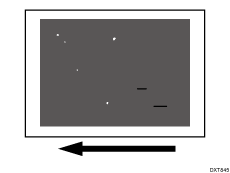
Cause:
Toner becomes coagulated in the toner supply path. White spots occur due to the coagulated toner and because the toner around it fails to be transferred. Colored streaks occur due to the coagulated toner melting in the development unit.
Occurrence conditions:
If the machine or toner has been left idle at high temperature (due to long vacation, etc.)
If the machine has received strong impact
When moving the machine
When printing solid-fill images

Due to the strong impact of the machine, the toner adhering to the PCDU drops into the developer and becomes coagulated.
Solution:
 Print a solid-fill image in each of 4 colors (cyan, magenta, black, and green) to determine the color in which white spots appear.
Because it is difficult to identify white spots on yellow, green is used instead of yellow.
 Print 30 to 300 full-page, solid-fill A3 sheets for the color in which white spots appear.
 Check to see if white spots has been resolved.
Yes | Finished! |
No | Go to the next step. |
 Replace the toner bottle of the color in which white spots appear.
 Print 300 full-page, solid-fill A3 sheets for the color in which white spots appear. Has the problem been resolved?
Yes | Finished! |
No | Contact your service representative. |